> ## Documentation Index
> Fetch the complete documentation index at: https://help.henshu.io/llms.txt
> Use this file to discover all available pages before exploring further.
# Welcome to Henshu
> Henshu is a block-based podcast editor with AI-powered tools. Instead of wrestling with timelines, you organize your episode as a stack of named blocks, then edit, improve, and generate.
## Overview
Henshu is a podcast creation platform built around **block-based editing**, a different way to think about audio. Instead of staring at a single long waveform on a timeline, you organize your episode as a stack of named blocks that you can rearrange, edit, and polish independently. Think of it like editing a document: you draft (record), outline (organize blocks), revise (edit within blocks), and polish (add music, improve audio, preview).
## What is block-based editing?
Traditional audio editors show your entire episode as one continuous waveform. A 45-minute interview looks like an undifferentiated blob. Everything looks the same, rearranging means tedious cut-and-paste, and you're constantly zooming in and out.
Henshu replaces this with blocks and sections:
* **Sections** are the major parts of your episode: "Intro," "Interview," "Outro." Each section is a named container you can drag to reorder.
* **Audio blocks** live inside sections and hold your actual recordings. You edit within each block independently (trimming, cutting, and improving) without affecting the rest of your episode.
* **Pause blocks** insert precise silence between audio for pacing and rhythm.
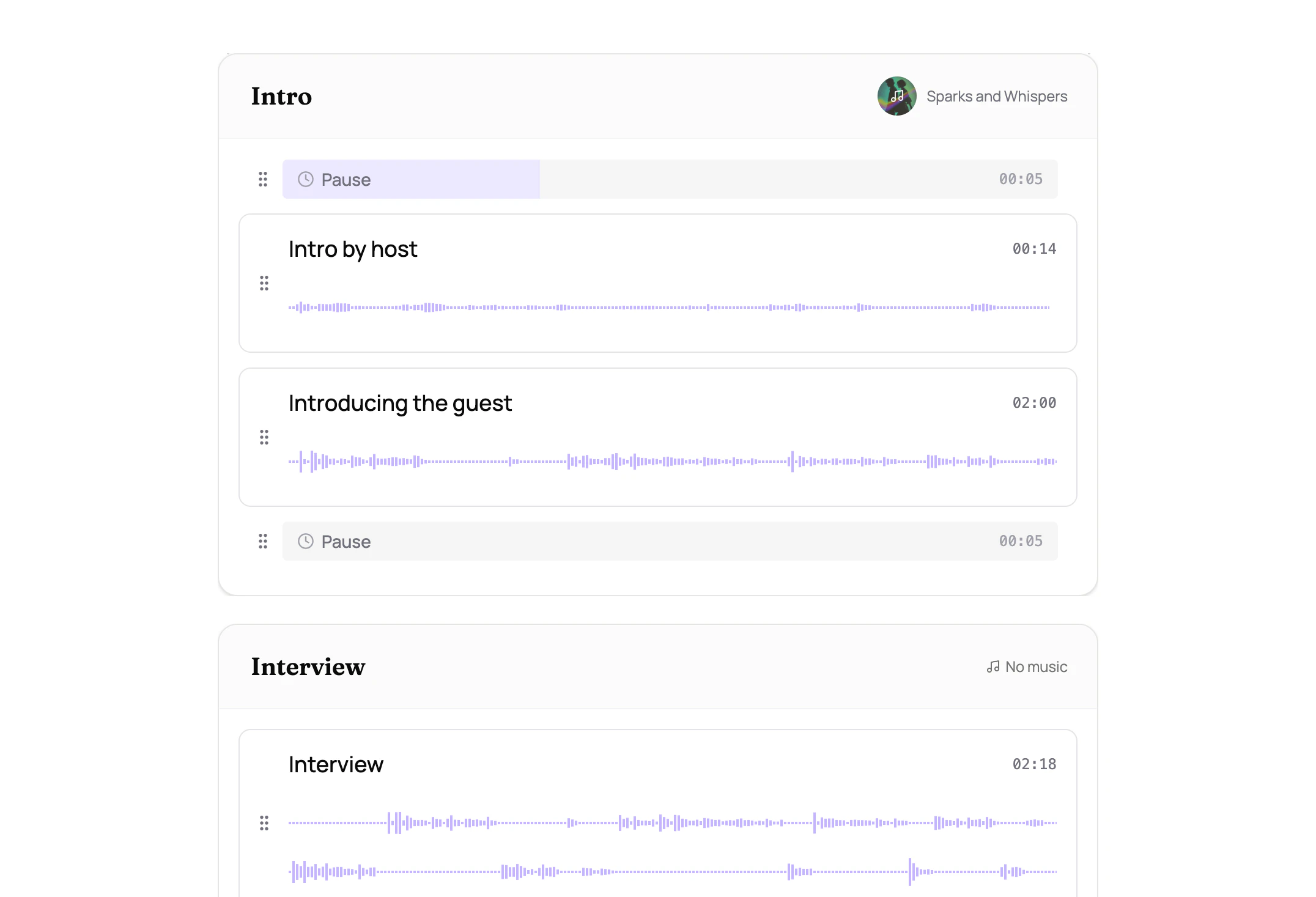 Rearranging your episode is as simple as dragging sections around, like moving paragraphs in a document. Each section also manages its own [background music](/editing/background-music) independently, so changes in one section don't affect another.
Block-based editing doesn't replace waveform editing. It sits above it. When you need fine-grained control, the waveform is right there inside each block. But you start from structure and meaning, not from raw audio.
## What else can Henshu do?
On top of block-based editing, Henshu gives you:
* [Transcribe and edit by selecting words](/editing/editing-audio), like editing a document (text-based editing)
* [Clean up recordings](/editing/ai-enhancement) with one-click noise reduction and volume leveling (AI audio improvement)
* [Add music](/editing/background-music) to individual sections with smart looping, volume ducking, and fade controls
* Automatically generate summaries, highlights, and chapters from your episode content (show notes generation)
* [Assemble everything](/publishing/generating) into a single, polished audio file ready to publish
## How Henshu works
The typical workflow follows these steps:
1. Create a show. A show is your podcast series (e.g., "My Weekly Podcast").
2. Create an episode. Each episode lives inside a show.
3. Upload your audio. Drag and drop your recordings into the episode.
4. Organize into sections and blocks. Structure your episode by naming sections and arranging blocks.
5. Edit. Trim, cut, and mute within each block using the waveform or transcript.
6. Improve and add music. Optionally improve audio quality and add background music per section.
7. Generate. Henshu assembles your blocks into a final audio file.
8. Download and share. Get your finished file and publish it wherever you host your podcast.
## Next steps
Learn the terminology used throughout Henshu: shows, episodes, sections, audio blocks, and more.
Follow a step-by-step walkthrough from creating a show to downloading your finished episode.
## Related
* [Concepts & Terminology](/getting-started/concepts): definitions of all Henshu-specific terms
* [Your First Episode](/getting-started/first-episode): step-by-step walkthrough
* [Plans & Quotas](/account/plans-and-quotas): understand your plan's limits
Rearranging your episode is as simple as dragging sections around, like moving paragraphs in a document. Each section also manages its own [background music](/editing/background-music) independently, so changes in one section don't affect another.
Block-based editing doesn't replace waveform editing. It sits above it. When you need fine-grained control, the waveform is right there inside each block. But you start from structure and meaning, not from raw audio.
## What else can Henshu do?
On top of block-based editing, Henshu gives you:
* [Transcribe and edit by selecting words](/editing/editing-audio), like editing a document (text-based editing)
* [Clean up recordings](/editing/ai-enhancement) with one-click noise reduction and volume leveling (AI audio improvement)
* [Add music](/editing/background-music) to individual sections with smart looping, volume ducking, and fade controls
* Automatically generate summaries, highlights, and chapters from your episode content (show notes generation)
* [Assemble everything](/publishing/generating) into a single, polished audio file ready to publish
## How Henshu works
The typical workflow follows these steps:
1. Create a show. A show is your podcast series (e.g., "My Weekly Podcast").
2. Create an episode. Each episode lives inside a show.
3. Upload your audio. Drag and drop your recordings into the episode.
4. Organize into sections and blocks. Structure your episode by naming sections and arranging blocks.
5. Edit. Trim, cut, and mute within each block using the waveform or transcript.
6. Improve and add music. Optionally improve audio quality and add background music per section.
7. Generate. Henshu assembles your blocks into a final audio file.
8. Download and share. Get your finished file and publish it wherever you host your podcast.
## Next steps
Learn the terminology used throughout Henshu: shows, episodes, sections, audio blocks, and more.
Follow a step-by-step walkthrough from creating a show to downloading your finished episode.
## Related
* [Concepts & Terminology](/getting-started/concepts): definitions of all Henshu-specific terms
* [Your First Episode](/getting-started/first-episode): step-by-step walkthrough
* [Plans & Quotas](/account/plans-and-quotas): understand your plan's limits